Simple Programming Example
Basic code to Assign Push Button to Digital Input Pin:
//LearnIoT Academy
//Assign Pushbutton LED with Serial Monitor
int ledPin = 2;    // choose the pin for the LED

int buttonValue = 0;

void setup()
{
  Serial.begin(9600);       //To setup Serial Monitor with 9600 baud output
  pinMode(ledPin, OUTPUT);  // declare LED as output
}

void loop()
{

  int buttonValue = analogRead(A0);  //Read in the button value
  Serial.println(buttonValue);    //To check if button was pressed

  if (buttonValue == HIGH) // check if the input is HIGH
    digitalWrite(ledPin, LOW);  // turn LED OFF
  else
    digitalWrite(ledPin, HIGH );  // turn LED ON
}
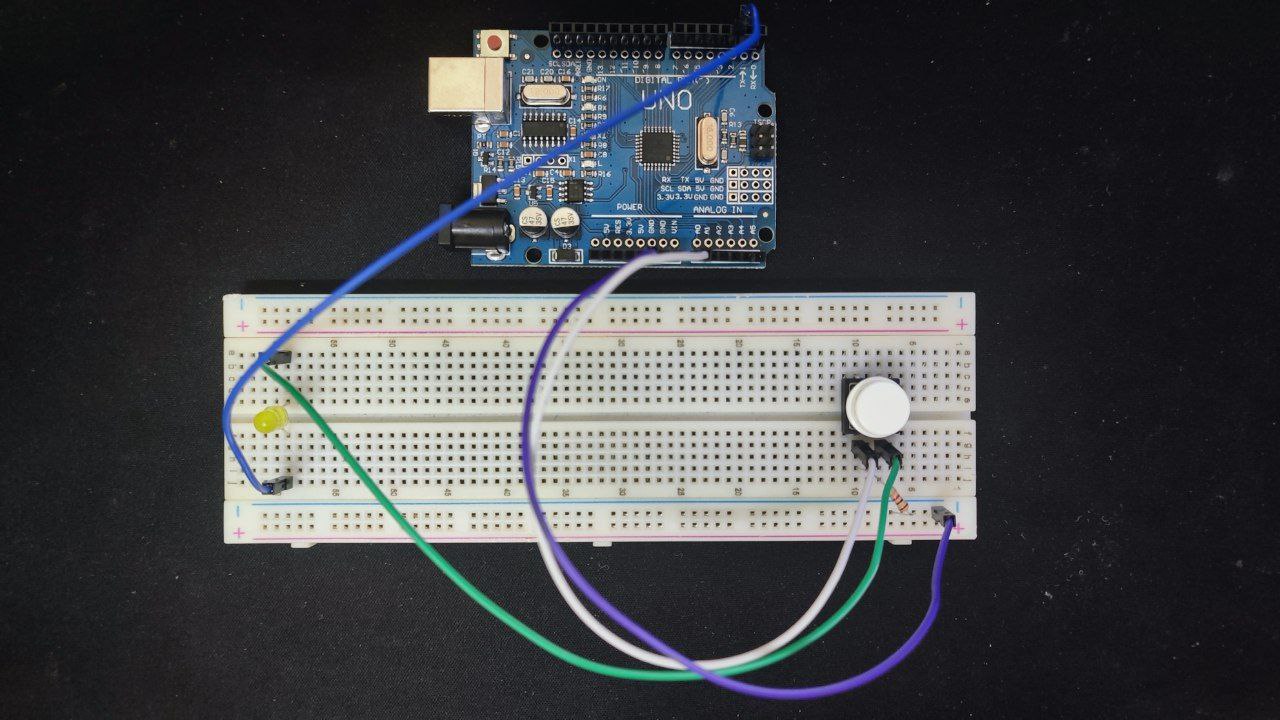
Below is a reference image for the wiring of the assign pushbutton:
Summary
The Serial Monitor will show output of “0” everytime the button is not being push and “600” above everytime it was pushed.